

Webseiten, die Videos zu Schulungs- oder Trainingszwecken anbieten, setzen oftmals auf eingebettete Vimeo-Videos. Diese Videos werden in den Privatsphäre-Einstellungen auf Domainebene berechtigt. Dies bedeutet, dass die betroffenen Videos nur auf der dafür berechtigten Webseite eingebettet werden können. Versucht man die Videos auf anderen Webseiten einzubinden, erscheint eine Fehlermeldung.
Die URL des Videos lässt sich ohne Probleme über den Quelltext der Webseite herausfinden, aber das hilft auch nicht weiter. Beim direkten Abspielen des Videos erscheint dieselbe Fehlermeldung.
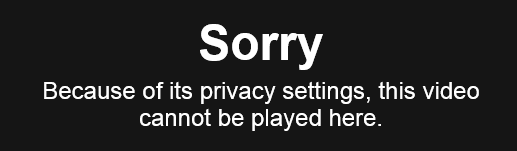
Sorry
Because of its privacy settings, this video cannot be played here.
Darüber hinaus ist auch der Download solcher Videos gesperrt. Viele Download-Tools versprechen zwar einen schnellen und einfachen Download, aber dies funktioniert in der Praxis nicht.
Download Vimeo-Videos
Wirft man einen genaueren Blick auf die Privatsphäre-Einstellungen bei Vimeo, ist schnell klar, wie die Privatsphäre auf Domainebene funktioniert. Grundsätzlich handelt es sich um gar kein wirkliches “Sicherheitsfeature”, denn die entsprechende Funktion basiert lediglich auf dem HTTP-Referrer. Damit ist es kein großes Problem an das gewünschte Video zu gelangen.
Zuerst wird der kostenlose Web-Debbuging-Proxy Fiddler benötigt. Mit Hilfe des Tools kann HTTP- und HTTPS-Traffic aufgezeichnet, analysiert und modifiziert werden. Fiddler kann hier heruntergeladen werden. Ich empfehle die Verwendung von Fiddler 4, welches allerdings ein installiertes .NET Framework 4 voraussetzt.
Nach erfolgreicher Installation kann Fiddler gestartet werden. Anschließend wählt ihr im Menü “Rules” und dann “Customize Rules… aus”. Alternativ könnt ihr auch das Tastenkürzel STRG + R nutzen.
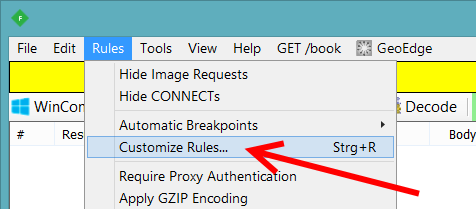
Ein Pop-Up-Fenster erscheint und fragt, ob ihr den Fiddler2 ScriptEditor downloaden und installieren wollt. Da die notwendigen Änderungen mit diesem Editor deutlich einfacher als mit Notepad sind, empfehle ich den Editor zu verwenden.
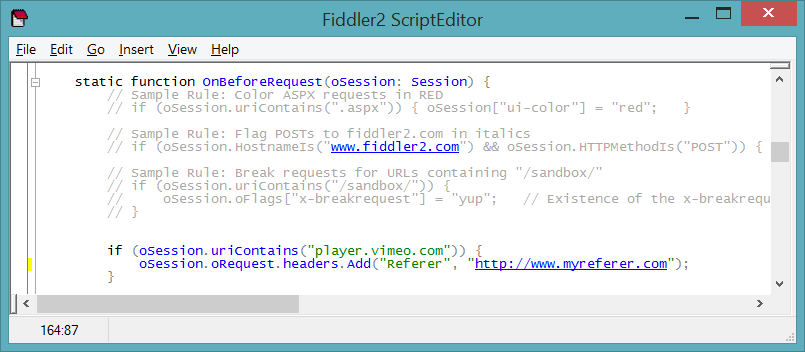
Im ScriptEditor müsst ihr nun nach “OnBeforeRequest” suchen. An dieser Stelle kann Code zum Ergänzen oder Ändern des HTTP-Headers eingefügt werden. In unserem Fall möchten wir beim Aufruf von Vimeo-Videos einen speziellen HTTP-Referrer übergeben. Dazu müsst ihr folgende zwei Regel ergänzen. Vergesst nicht den Referrer anzupassen.
if (oSession.uriContains("vimeocdn.com")) {
	oSession.oRequest.headers.Add("Referer", "http://www.myreferer.com");
}
if (oSession.uriContains("player.vimeo.com")) {
    oSession.oRequest.headers.Add("Referer", "http://www.myreferer.com");
}
Jetzt könnt ihr die Datei speichern und den ScriptEditor beenden. Fiddler muss aber geöffnet bleiben!
Zum Schluss müsst ihr lediglich noch dafür sorgen, dass euer Download-Tool über Fiddler läuft. Dies geschieht über die Konfiguration eines Proxy-Servers. Da dies in jedem Tool unterschiedlich aussieht, gehe ich nicht weiter darauf ein. Als Proxy-Server-IP muss “localhost” und als Port “8888” verwendet werden.
Jetzt solltet ihr geschützte Vimeo-Videos ohne Probleme downloaden können.







Neueste Kommentare